FrontSail 26.06: Meet Fronty
Meet Fronty, your virtual operations assistant: ask, review, and act straight from chat. Plus a redesigned Portal, new Analytics, and faster Frontdesk voice.
 The FrontSail AI team 8 min read
FrontSail now has a much easier way to get work done.
Meet Fronty, your virtual operations assistant.
Fronty helps you understand what is happening across your business and run FrontSail without clicking through every screen yourself. Ask a question, review customer conversations, find work that needs attention, and act on it straight from the chat.
This month also brings a redesigned Portal, a new Analytics experience, SMS notifications across Canada and the United States, and faster, less annoying voice calls.
But the biggest change is Fronty.
Meet Fronty
We launched our Backoffice Assistant in beta earlier this year. This month it got a name, a new interface, and a much bigger job inside FrontSail.
Fronty is your virtual operations assistant for the work that customer conversations create.
A call, a message, a quote request, a complaint, a callback: the conversation is only the start. Someone still has to figure out what happened, decide what comes next, find the right information, and move the work along. Fronty is being built to help with exactly that.
Open it from anywhere in the Portal and ask in plain English:
- What calls did we miss yesterday?
- Show me customers waiting for a callback.
- What were people calling about this week?
- Find the conversation with John about the broken window.
- Update our Knowledge Base with the new weekend hours.
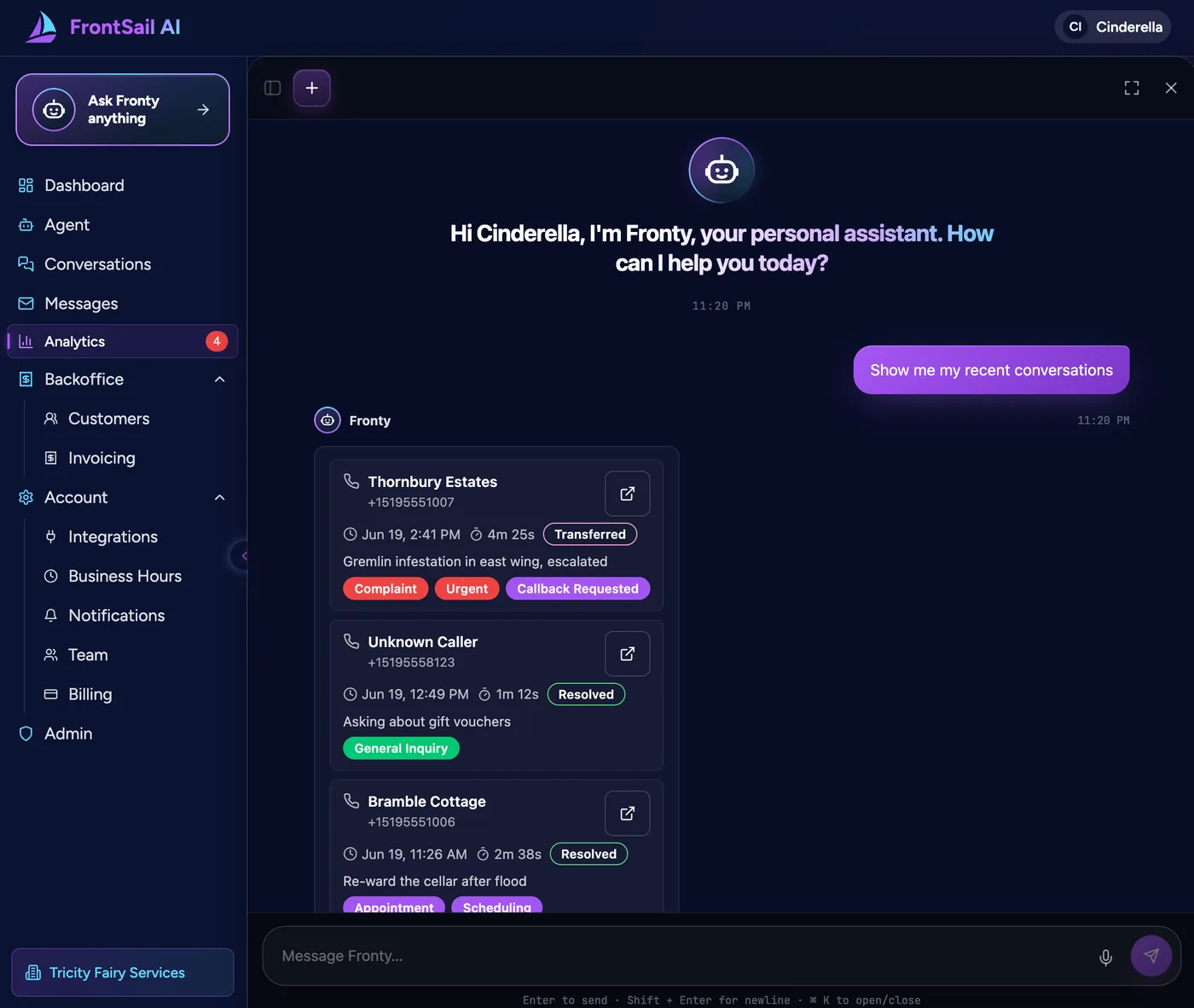
And Fronty answers with more than text. It can show interactive call lists, offer quick actions, lay out structured information, and put a confirmation card in front of you before it changes anything.
That last part matters. We do not want Fronty to be a chatbot parked next to the product, cheerfully telling you which buttons to press. We want it to be a way to use the product by talking to it.
So instead of clicking through several pages to find a conversation, ask Fronty to find it. Instead of reading every call to see what happened yesterday, ask for a summary. Instead of hunting for the right setting, just describe what you want to change.
The old interface is not going anywhere. Sometimes a table or a checkbox is still the fastest way to do something, and revolutionary technology has not yet defeated the dropdown menu. But you should not have to learn the whole map of FrontSail before you can use it. When you know what you want and not where it lives, Fronty is one click away.
Fronty is learning skills
Fronty now has a growing set of skills. A skill bundles the instructions and tools for one kind of work, like reviewing conversations, managing the Knowledge Base, or configuring the system. Fronty loads the skill it needs for your request instead of carrying one giant set of instructions for everything.
That makes it more capable, and easier for us to control and improve. We add new skills carefully: every action stays inside your organization and your permissions, and Fronty asks before making changes that should not happen silently.
It is still an interactive beta. Fronty cannot operate every corner of FrontSail yet, and now and then the old-fashioned button wins. But the direction is set: less time operating software, more time telling Fronty the outcome you want.
See what customers actually need
The second big addition this month is a new Analytics experience.
Old-school call analytics answer how many calls you got, how long they lasted, and how many you missed. Useful, but they never tell you why people called or what those calls left on your plate.
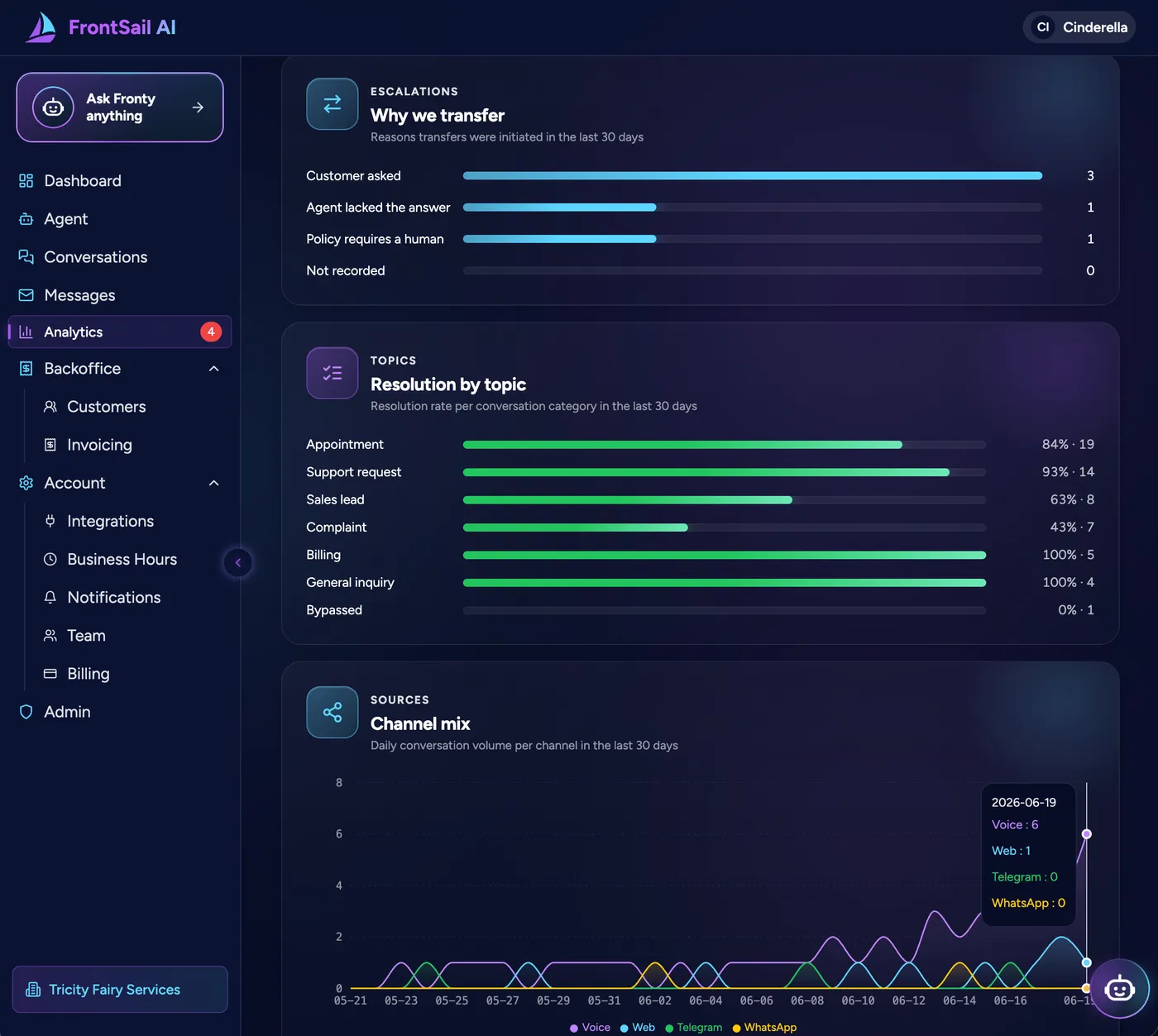
FrontSail Analytics is built around the content and outcomes of conversations instead. The new Insights and Trends views show what customers are contacting you about, which requests are growing, when demand peaks, how much needs follow-up, and how it all splits across departments. Insights is the picture of what is happening right now; Trends is how that shifts week over week, so a climbing request type shows up before it turns into a backlog.
So instead of “25 calls yesterday,” you see that eight were new sales opportunities, six were service requests, three were urgent, and a few people are still waiting to hear back. That is the difference between knowing your phone was busy and knowing which jobs you nearly lost, and which one to follow up on first.
Analytics also surfaces things worth your attention in an Insights inbox, so you are not left staring at charts until wisdom arrives. It might flag a spike in a specific complaint, a customer who has been waiting too long for a callback, or a quiet shift in what people are asking for. Daily and weekly email digests then keep owners and managers in the loop without opening every call.
Call tracking tells you someone called. FrontSail tells you why they called, what happened, and what still needs doing.
A redesigned Portal, with Fronty built in
We rebuilt the Portal on a shared design system. The dashboard, Analytics, assistant configuration, Knowledge Base, sign-in, billing, and Fronty itself all got the redesign, and the whole thing is more consistent and easier to move around.
The bigger deal is that Fronty is now part of the interface, not a feature off to the side. Whenever you are unsure where a setting lives or what to do next, you can ask Fronty for help in one click, right where you are. Stuck on where to change your greeting? Ask, and Fronty either walks you to the right screen or just makes the change for you. The structure of the product stops being something you have to memorize before you can use it.
Onboarding got simpler too: FrontSail can recognize your business, read its website, and stand up a working assistant in three clicks.
Faster, less annoying voice
The Frontdesk Assistant got a serious round of voice work. Responses are now about 50% faster, so conversations feel immediate instead of laggy, and we cut a lot of the verbosity, repetition, and awkward pauses along the way.
It is also better at the small things that make a call feel human: keeping answers short, catching quick replies, letting people finish, reading phone numbers at a sane pace, and not asking questions it does not need to. Voice is unforgiving. A reply that is a beat too slow feels broken, and a pointless question is far more annoying when you have to sit through it out loud.
A few more upgrades
FrontSail can now text your team. SMS notifications work across Canada and the United States, so when an important call or message comes in, the right person gets a short summary: who it was, what they need, how urgent it is, and what to do next. Handy when owners or field crews are not sitting in front of the Portal.
Managing the Knowledge Base is easier, too. During onboarding FrontSail can draft it from your website, so you start with something to edit instead of a blank page, and every change is now versioned so you can review or roll back. When something needs fixing, you can skip the editor and just ask Fronty to update your hours or correct an answer.
Routing got smarter as well. It now reads the meaning of a conversation instead of a tag or a menu choice, so a sales lead goes to sales, a service problem reaches the service team, and an urgent request gets escalated instead of quietly starting a new life in a general inbox.
What changed this month
FrontSail started as a better way to answer the calls businesses could not get to. It is turning into something wider: an assistant that understands customer conversations, spots the work they create, and helps you move it forward.
Fronty makes FrontSail conversational. Analytics turns those conversations into a real read on customer demand. The redesign puts Fronty one click away wherever you are. Faster voice, text alerts, smarter routing, and an easier Knowledge Base round it out.
The call may be over.
The work is not.
Now you can ask Fronty what happens next.
Put Fronty to work
Create a working FrontSail AI assistant in three clicks, test it using your own business, and start free.
Put My Assistant to Work