"Nobody wants to talk to AI"… but iOS 26 quietly proved the opposite
We often hear: "No one wants to talk to AI — it'll annoy customers." But Apple just shipped AI call screening in iOS 26 — a pretty strong signal that voice AI is now "normal", and that what people really want is less wasted time.
 The FrontSail AI team3 min read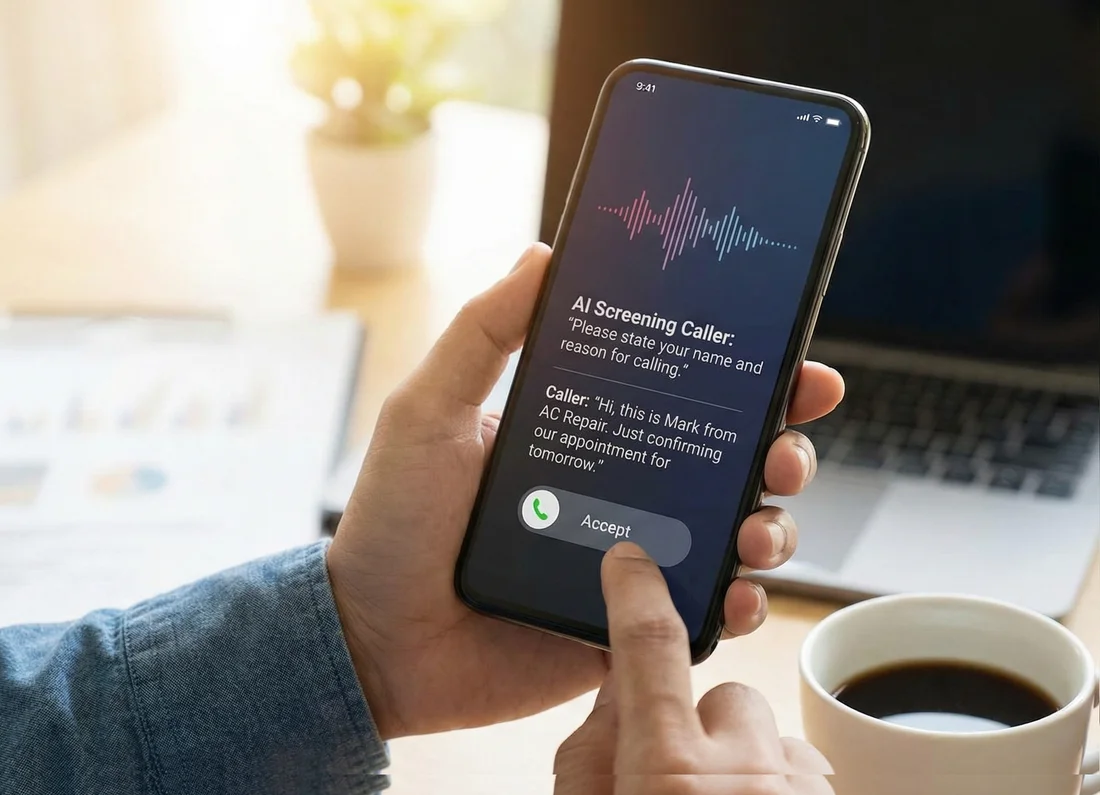
When we talk to business owners, a common objection is:
“Customers don’t want to deal with AI. They’ll be dissatisfied.”
That instinct makes sense — if AI equals slow, robotic, or confusing.
But the world changed. Everyone’s attention is maxed out. Notifications never stop. Everything competes for our focus. So when someone calls your business, they don’t want a “chat.”
They want one thing:
“Help me solve this — with as little time and effort as possible.”
Apple’s iOS 26 call screening is the tell
Here’s an interesting validation point: iOS 26 introduced Call Screening. When it’s enabled, your iPhone can automatically answer unknown callers and ask for their name and reason for calling — then it shows you the response so you decide whether to pick up.
Think about what that means:
- Apple is putting an AI voice layer directly between people and their calls.
- Millions of users will opt into it because the benefit is obvious: save time, reduce interruptions, filter spam.
- The “AI talking to me” part isn’t the problem. The problem is time waste.
If people truly refused to interact with voice AI on principle, this feature wouldn’t exist — and it definitely wouldn’t be positioned as a mainstream quality-of-life improvement in the Phone app.
The real truth: customers don’t hate AI — they hate friction
What frustrates callers is:
- repeating themselves
- being put on hold
- leaving voicemails that go nowhere
- calling during business hours and still not reaching anyone
- “can you call back later?” (with no context)
A virtual phone receptionist solves that by being fast, consistent, and clear.
Not “human.” Not chatty. Not pretending.
Just effective.
What a virtual receptionist can do (that customers actually appreciate)
A good AI receptionist can:
- Answer FAQs instantly (hours, location, service area, pricing ranges) using your script
- Take messages and reliably capture required details (name, number, issue, urgency, address, callback window)
- Check availability at the time that’s most convenient for the caller — including outside business hours
- Handle appointment changes anytime (reschedule/cancel) when life happens — saving you time and reducing no-shows
That’s not novelty. That’s customer experience.
“But what if it says the wrong thing?”
Healthy concern — and you don’t have to gamble.
Start the safest way: after-hours only.
No risk to your daytime calls, and you capture leads that would otherwise hit voicemail or disappear. We wrote a full guide on this rollout approach on our blog.
And because Frontsail logs calls, you can review audio + transcripts and tighten the script over time.
The takeaway
iOS 26 Call Screening is a big signal: voice AI has crossed the line from “weird” to useful default.
So the question isn’t “Will customers hate talking to AI?”
It’s:
“Will customers be happier if their problem gets handled quickly, clearly, and without wasting their time?”
In 2026, that’s the bar.
If you want more practical playbooks like this, we’re publishing them on our blog (including the after-hours rollout and our intake scripts).
Want to try this the low-risk way? Start after-hours only.
If you're a service business and missed after-hours calls are a recurring problem, we'd love to help you stop losing them.
Book a 15-min Setup Call